A free walkthrough
Build a fair call schedule in minutes, using an AI agent that doesn’t hallucinate.
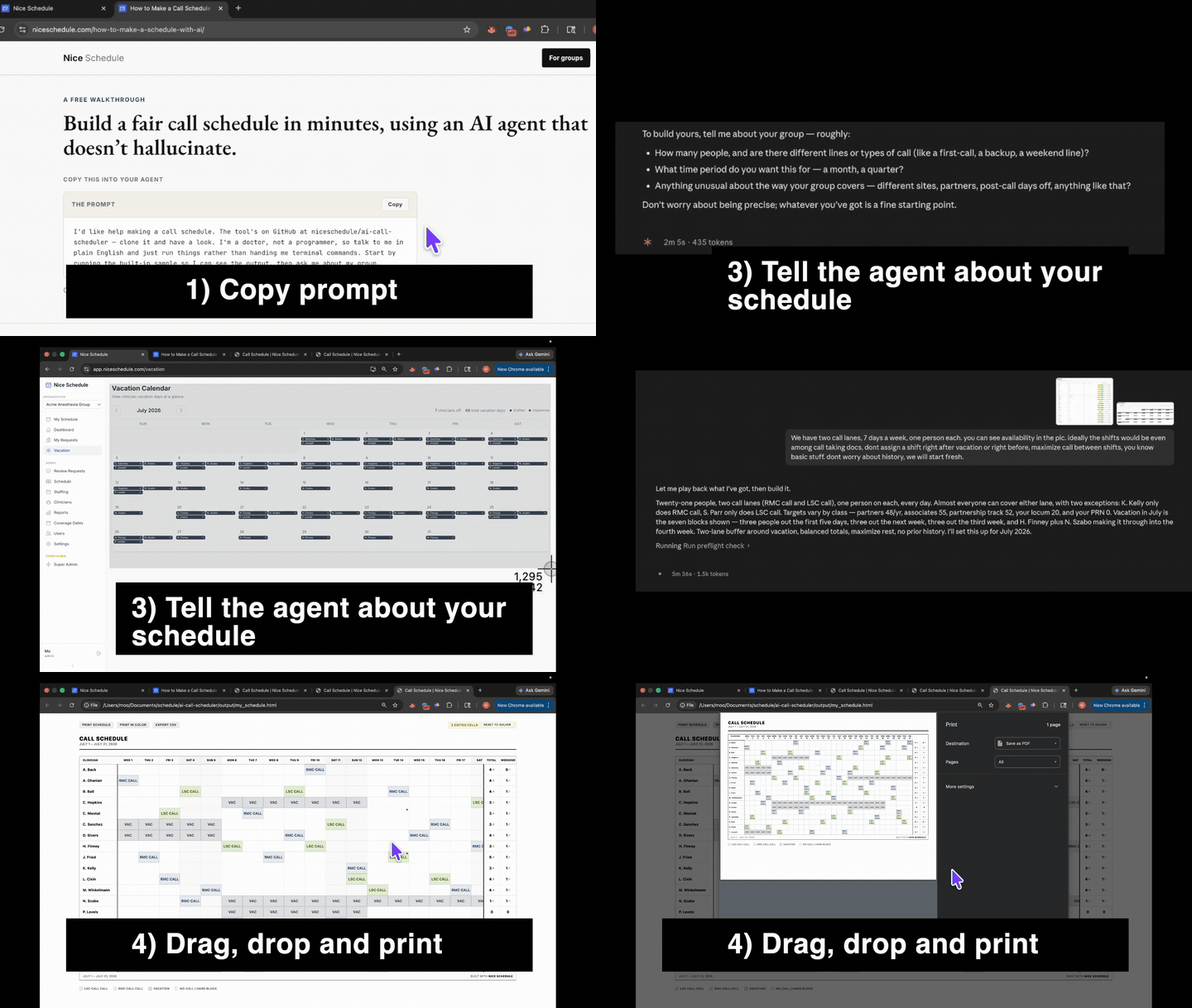
I'd like help making a call schedule. The tool's on GitHub at niceschedule/ai-call-scheduler — clone it and have a look. I'm a doctor, not a programmer, so talk to me in plain English and just run things rather than handing me terminal commands. Start by running the built-in sample so I can see the output, then ask me about my group.
The repo itself: github.com/niceschedule/ai-call-scheduler — MIT-licensed, the same code the prompt points your agent at.
Or want us to build it? PostCallMD builds the solver around your rules and stands it up for your group.
Demo
See an AI agent build a fair call schedule, end to end.
Why this page exists
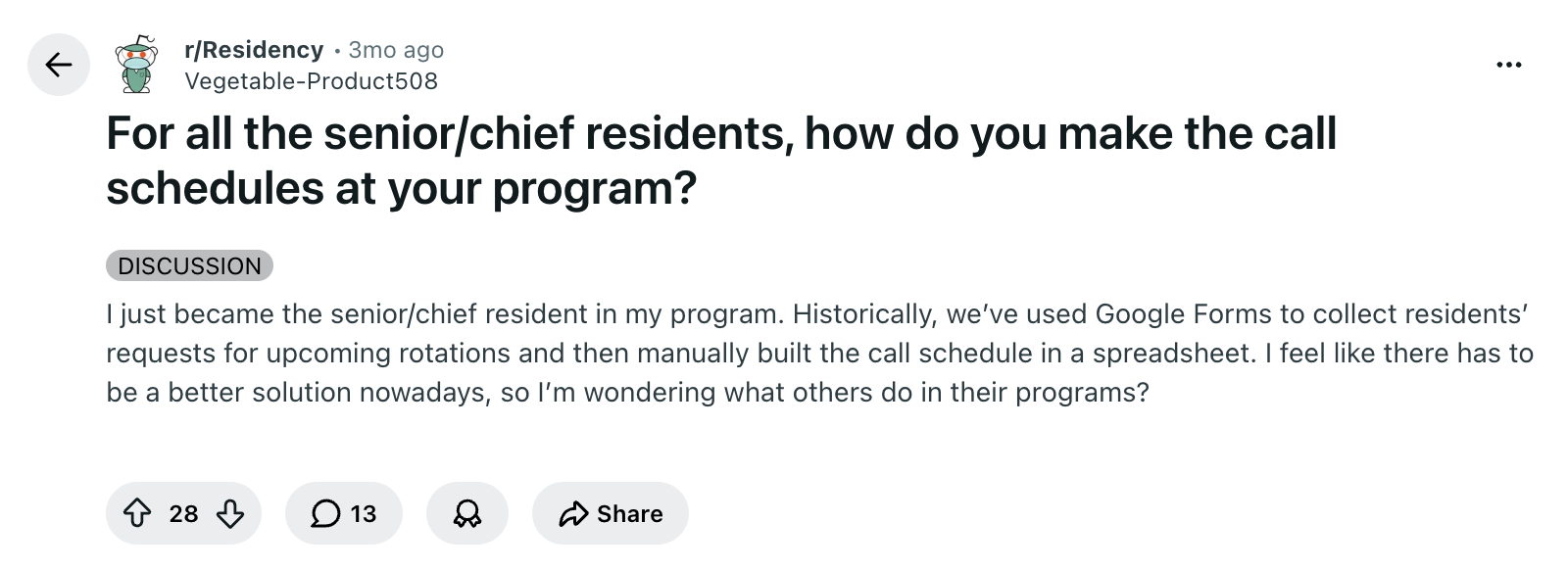
A senior resident asked Reddit. The top reply said no AI could do it.
They were half right. ChatGPT alone won’t build you a fair call schedule. It’ll happily invent one that looks fine, double-book a post-call doc, and quietly skip a vacation request. But an AI coding agent, pointed at a small open-source scheduler, will do it deterministically and in seconds. That’s the gap this page closes.

I built the free walkthrough for the senior resident, the chief, the fellow, the one partner in the group, the person who got handed the spreadsheet and is now spending every other weekend trying to make it fair. If that’s you, paste the prompt above into your agent. If you know someone like that, send them this page.
What your agent will produce
A printable schedule that respects every rule.
Below is what comes out of the sample run, laid out as a real call calendar. Two weeks. Six clinicians. One OR shift and one OB shift per day. Every hard rule respected. Your agent runs this exact sample first, so you can see the mechanics work before swapping in your own group.
Go ahead and try it: drag any OR or OB shift to another clinician’s row. The shift counts on the left re-tally so you can see fairness shift in real time. Vacations and hard blocks stay locked.
| Clinician | 1 Mon |
2 Tue |
3 Wed |
4 Thu |
5 Fri |
6 Sat |
7 Sun |
8 Mon |
9 Tue |
10 Wed |
11 Thu |
12 Fri |
13 Sat |
14 Sun |
|---|
A few things worth noticing, because they prove the rules were respected, not invented around:
- Cary’s vacation June 5–7 is honored. Zero assignments those days. Want to add a pre-call buffer? Just one prompt away.
- Reed’s hard block on June 2 is honored, even though Reed covers five other shifts in the window.
- Johns asked off OB on June 10 only (one shift type, not the whole day). The schedule honored that without blocking other shift types. That distinction matters in real groups.
- Weekend calls are spread across the group. Nobody is “the one who always covers.”
What your agent will need from you
Four things. You don’t type any of them into a spreadsheet. Unless you want to.
Your agent does the formatting. You paste what you already have, in whatever shape you have it.
Your roster
Names of the people on call, and what each person can cover. A bulleted list works. A screenshot of the roster from QGenda works too.
Your coverage pattern
Which shifts run on which days. “One OB every day, one OR every weekend day, two OR on weekdays” is enough.
Time-off requests
Vacation, no-call, and soft preferences. Paste a screenshot of the request list inside Sheets, QGenda or wherever the data lives. Don’t retype them.
Recent history
Last month or two of who covered what, so the new schedule stays fair against what just happened. Or tell the agent you’re starting fresh.
Why this works (and ChatGPT alone doesn’t)
Plausible answers vs. checked answers.
Once upon a time, if you asked an LLM how many r’s were in strawberry, it would confidently tell you two. A one-line Python program would just count the letters and return three. That’s the difference between a plausible answer and a checked answer.
Your call schedule needs the checked answer. A language model predicts the most likely next token, which is genuinely great for translating messy human rules into something more precise. It’s the wrong tool to be the schedule. It will produce a calendar that looks reasonable and quietly skip a vacation, double-book a post-call physician, or leave a weekend uncovered.
A real scheduler works differently. You hand it the people, the shifts, and the rules. It searches for assignments that satisfy every rule. If the rules conflict, it tells you the schedule is impossible instead of inventing one.
The scheduler under the hood is Google’s OR-Tools, the open-source engine they use for routing and logistics. It’s deterministic, it doesn’t hallucinate, and it’s free. Your AI agent’s only job is to translate your group’s rules into the scheduler’s inputs and read the results back to you.
Which AI
Use Claude Code or Codex, not a chat window.
This walkthrough is built around an AI agent that runs on your laptop and can read files, run programs, and open the schedule for you to look at. Two options, both free to try:
- Claude Code from Anthropic. claude.com/claude-code
- Codex from OpenAI. openai.com/codex
A chat window like ChatGPT or Claude.ai can’t do this. It can’t read your roster files, can’t run the scheduler, and can’t open the output. It’ll guess at what your inputs look like and make confident things up. The whole point of pointing an agent at the open-source project is that the agent can actually do the work and check itself, instead of guessing.
Privacy
The schedule never leaves your laptop.
Even without patient information, physician schedules, vacation requests, and internal group rules can still be sensitive. Three things to know:
- The scheduler runs on your machine. The schedule itself is computed locally and never uploaded.
- Your AI assistant still sees the conversation you have with it. Pick a tool that doesn’t train on your inputs, both Claude Code and Codex have settings or default behavior for this. Check before you paste real names.
- A local-folder agent is safer than a chat window because the agent can read your files without you copy-pasting your group’s roster into a public tool.
If you’d rather not paste real names into any AI tool at all, use initials or made-up IDs for the first run. The schedule comes out the same shape either way.
Where this stops being enough
This is great until the rules get real.
The basic pattern is not magic. The hard part is making it work for a real group, month after month: cleaning a steady stream of requests, importing historical fairness across months, modeling local exceptions, fixing infeasible months without burning a Saturday, post-call recovery, locked assignments, holiday rotation, secure access, schedule distribution, and the maintenance work nobody wants to own.
That’s roughly the moment a DIY script stops being enough. A real schedule needs a place where requests live, where history is tracked across months, where people can be added or removed without breaking previous solves, and where the schedule can be safely shared with the group after it’s reviewed.
If that’s the wall you’ve hit, see how PostCall handles it for real groups, or jump to the cards below.
A note from the founder
We’re a small team. For the full build, where we sit down, model your rules, and stand the whole thing up, we can only take on a couple of new groups a month. And honestly, that’s what most groups pick: we build the machine, and the schedule stays theirs.
But you just made it through the walkthrough. If you got this far and you’re comfortable letting an agent do the work, I don’t think you should have to wait for a slot — or pay the full freight.
So here’s how you skip the line: I’m building a self-serve version. For a fraction of the cost, you’d point an agent at an onboarding repo, much like this one, and it sets you up on our PostCall app as a system of record. Basically it helps you connect your own solver to a place where you can edit the schedule, manage requests, and distribute it. You drive, the agent does the heavy lifting, and you pay a fraction of the full build. It’s not open to everyone yet, only to the folks who are comfortable with agents. We're rolling it out to a few groups at a time to fine tune the process and ensure it actually works for them.
I’ll be straight with you: like this project it can be a bit bumpy. But what you end up with is the real thing — a genuinely fair scheduling tool and a system of record that’s reliable and works. If you want in early, email me and tell me about your group. And if you’d rather we just built it for you — that door’s always open.
— Moultrie